
The SideKick can be individually configured:
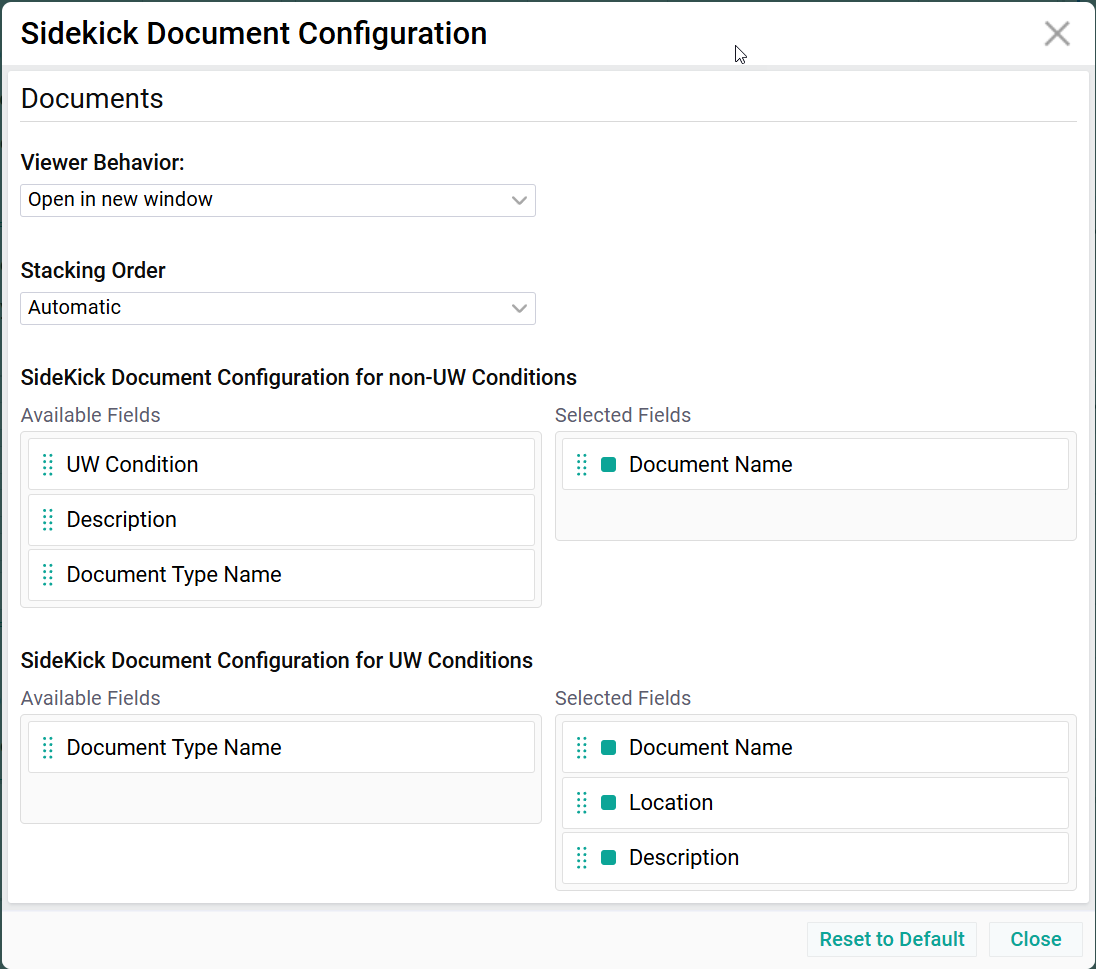
Documents
Viewer Behavior
Configuration on how Documents are viewed upon double-clicking
- Pop up -> Will open documents in a pop up.
- New window (reused) -> Will open a document in a new window. Subsequent documents will replace the document in the same window: Resulting in only one document viewer window.
- New window (one per document) -> Will open each document in a new window: Resulting on multiple viewer windows.
- New tab (reused) -> Will open a document in a new browser tab. Subsequent documents will replace the document in the same browser tab: Resulting in only one additional browser tab.
- New tab (one per document) -> Will open each document in a new browser tab: Resulting on multiple browser tabs.
Stacking Order
Defines the stacking order of documents within SideKick. This relates to Views within Document Management.
- Automatic (Default) -> According to the most recently used View in DocumentManagement
- View 1 (Example) -> Document Management View 1 as configured by the Administrator
- View 2 (Example) -> Document Management View 2 as configured by the Administrator
- ... and more...
SideKick Document Configuration for non-UW Conditions
Applies to all Pages except the UW Page.
Fields of Documents shown in the Documents List and their Sequence.
SideKick Document Configuration for UW Conditions
Applies exactly to the UW Page.
Fields of Documents shown in the Documents List and their Sequence.
Sidekick Configuration (step-by-step) Training Video